Three cool pre-made styles for your CLI
Three copy-and-paste rich-click style configurations, with generated example output for each.
- --author
 Daniel ReevesCo-maintainer
- --published
- --tag
- miscellaneous
rich-click’s default style is nice, and naturally it’s what most of our users end up using. But we won’t be offended if you want to change things up!
rich-click is flexible in terms of the custimisation options it gives you. In this blog post, we want to highlight a few neat design ideas for your CLI that you can do with rich-click.
1. Simple boxless one-color CLI
Section titled “1. Simple boxless one-color CLI”You may associate rich-click with boxes, but did you know you can strip the box away?
Here is an example of a rich-click style that does just that, and produces a nice and clean one-color format:
Code for 1. Simple boxless one-color CLI
# /// script# dependencies = [# "rich-click",# ]# ///
style_options_panel_box="SIMPLE_HEAD", style_commands_panel_box="SIMPLE_HEAD", style_options_panel_border="bold", options_panel_title="[u]Options[/]", style_commands_panel_border="bold", commands_panel_title="[u]Commands[/]", style_option="blue", style_usage="", style_usage_command="", style_argument="blue", style_switch="bold blue", style_command="blue", style_metavar="dim", text_markup="markdown", max_width=100)
def cli(): """ CLI for `app`
This `app` lets you do cool things. """
@cli.command("db")def deploy(): """Database commands for app"""
@cli.command("deploy")def deploy(): """Deploy app"""
@cli.command("self")def self(): """Manage app"""
if __name__ == "__main__": cli()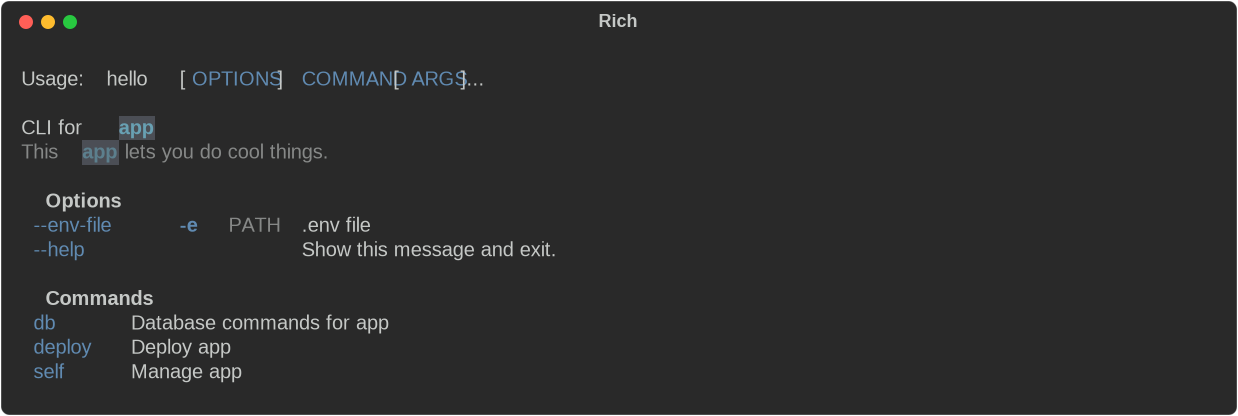
2. Dark mode / light mode aware with three colors
Section titled “2. Dark mode / light mode aware with three colors”For now, neither Rich nor rich-click has a concept of dark mode or light mode. However, there are third party packages that can detect the background color of most terminals. Checking the terminal bg makes using RGB hex values much easier.
Here is an example of such a tool you can use:
pip install term-backgrounduv add term-backgroundrye add term-backgroundrye syncThe following example looks great in both dark and light terminals!
Code for 2. Dark mode / light mode aware with three colors
# /// script# dependencies = [# "rich-click",# "term-background",# ]# ///
from term_background import is_dark_background
if is_dark_background(): primary_color = "#99bbf2" secondary_color = "#c099f2" tertiary_color = "#d1d43d"else: primary_color = "#2b569c" secondary_color = "#5c2b9c" tertiary_color = "#c4b74f"
style_option=f"bold {secondary_color}", style_argument=f"bold {tertiary_color}", style_command=f"bold {primary_color}", style_switch=f"bold {secondary_color}", style_metavar=tertiary_color, style_metavar_separator="", style_usage=f"bold {primary_color}", style_usage_command="", style_helptext_first_line="bold", style_helptext="", style_option_default=tertiary_color, style_required_short="bold red", style_required_long="red", style_options_panel_border=f"dim {secondary_color}", style_commands_panel_border=f"dim {primary_color}", text_markup="markdown", max_width=120)
def cli(): """ CLI for `app`
This `app` lets you do cool things. """
@cli.command("db")def deploy(): """Database commands for app"""
@cli.command("deploy")def deploy(): """Deploy app"""
@cli.command("self")def self(): """Manage app"""
if __name__ == "__main__": cli()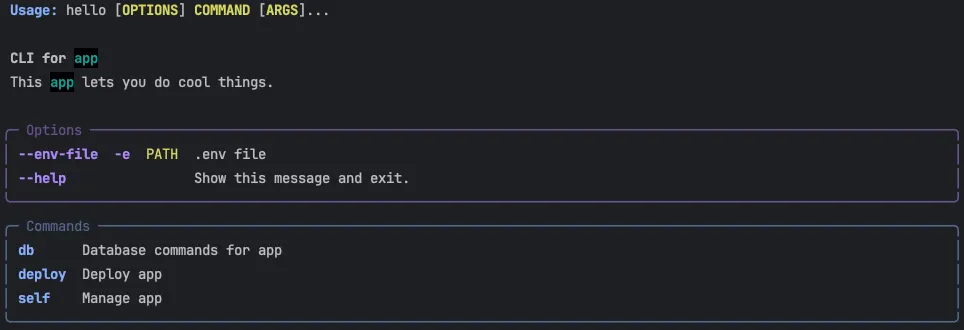
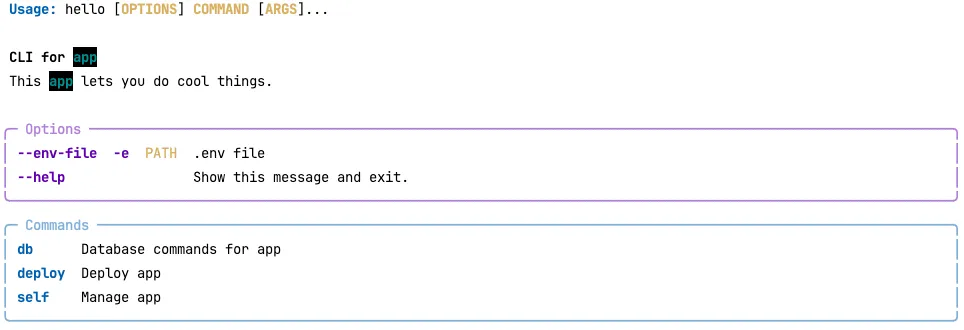
3. Gradient art header
Section titled “3. Gradient art header”The following example combines ideas from the first two examples, and then adds in text2art from the art package with Gradient from the rich-gradient package.
The below example requires rich-click>=1.8.4, as previous versions do not support Gradient() objects for the header_text.
pip install term-background art rich-gradientuv add term-background art rich-gradientrye add term-backgroundrye add artrye add rich-gradientrye syncCode for 3. Gradient art header
# /// script# dependencies = [# "rich-click>=1.8.4",# "term-background",# "art",# "rich-gradient",# ]# ///from art import text2artfrom term_background import is_dark_background
if is_dark_background(): primary_color = "#99ff00" secondary_color = "#ffdd00"else: primary_color = "#77bb22" secondary_color = "#aa9922"
style_options_panel_box="SIMPLE", style_commands_panel_box="SIMPLE", style_option=f"bold {secondary_color}", style_argument=secondary_color, style_command=primary_color, options_panel_title="[u]Options[/]", commands_panel_title="[u]Commands[/]", style_switch=secondary_color, style_metavar="bold", style_metavar_separator="", style_usage=f"bold {primary_color}", style_usage_command="", style_helptext_first_line="bold", style_helptext="", style_option_default="", style_required_short="bold", style_required_long="", style_options_panel_border=f"bold {secondary_color}", style_commands_panel_border=f"bold {primary_color}", text_markup="markdown", max_width=120)
def cli(): """ CLI for `app`
This `app` lets you do cool things. """
@cli.command("db")def deploy(): """Database commands for app"""
@cli.command("deploy")def deploy(): """Deploy app"""
@cli.command("self")def self(): """Manage app"""
if __name__ == "__main__": cli()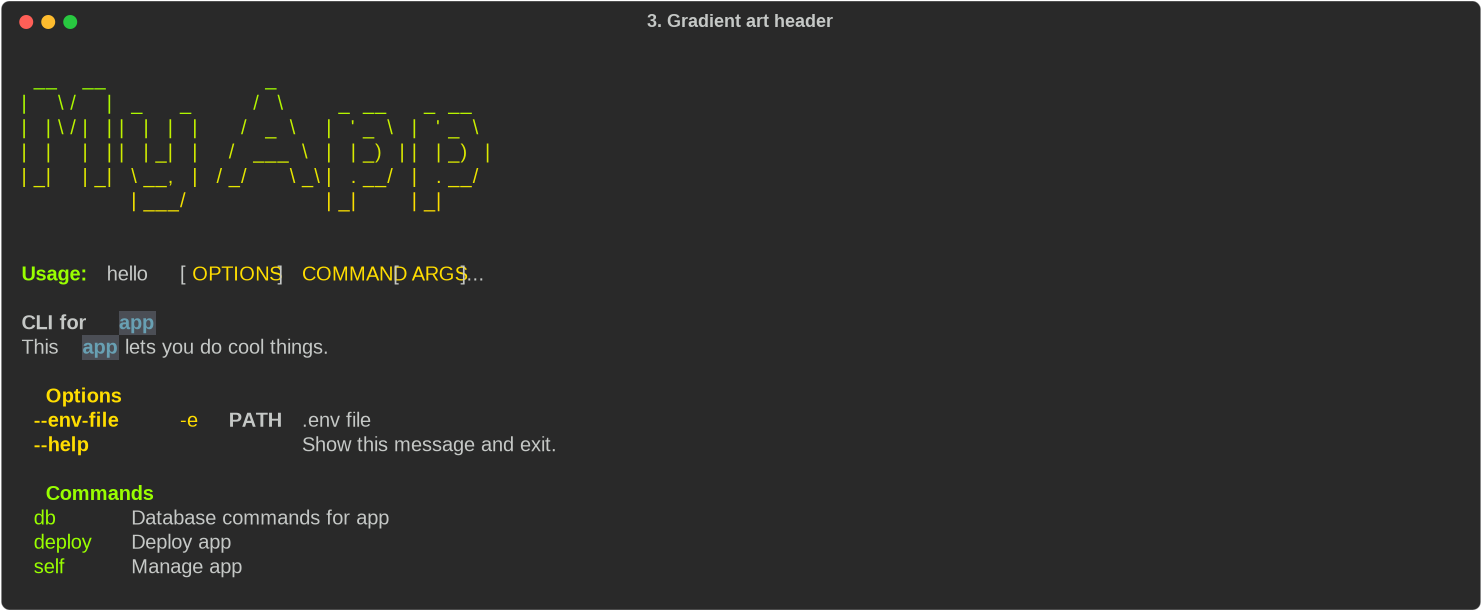
Parting notes
Section titled “Parting notes”Thank you for reading, and I hope you find this blog helpful and inspiring.
Phil and I have been really busy on a bunch of other things, but we haven’t forgotten about our roadmap for rich-click 1.9.
We hope to get 1.9.0 released by the middle of 2025.
Stay tuned for more updates!
Lastly, if you are attending PyCon Sweden on November 14-15, 2024, be sure to check out Phil Ewels’ talk about rich-click.