New blog + v1.8 released!
rich-click 1.8 lands alongside a new documentation site and Live Style Editor: SVG and HTML output from the CLI, an easier decorator API, more style options and better performance.
- --author
 Daniel ReevesCo-maintainer
- --author
 Phil Ewelsrich-click creator
- --published
- --tag
- release-notes
Today we are very happy to release version 1.8 of rich-click, and along with it - this blog!
New docs website and blog
Section titled “New docs website and blog”Until now, rich-click has just had a GitHub repo and all documentation has been in the README. Now, we have full docs! We’ve fleshed out the documentation from the README, and we’ll continue to add to it over time.
Live Style Editor
Section titled “Live Style Editor”The coolest addition allowed by this change to full documentation is the Live Style Editor.
We built this to address a problem we noticed, which is that the vast majority of users rely on the default rich-click styles. Although we do think rich-click’s defaults are pretty good, it pointed to a potential developer experience issue that so many CLIs relied on the defaults. We hope that the live style editor makes it easier for users to make style changes and to personalize their CLIs. 😁
Here is an example of a style that Phil made with the style editor:
Phil's Generated Code
style_option="bold cyan", style_argument="bold cyan", style_command="bold green", style_switch="bold green", style_metavar="green", style_metavar_separator="dim blue", style_usage="bold italic magenta", style_usage_command="bold yellow", style_helptext_first_line="bold italic white", style_helptext="dim italic yellow", style_option_default="bold yellow", style_required_short="bold red", style_required_long="bold red", style_options_panel_border="italic blue", style_commands_panel_border="italic blue")
def cli(foo, bar): """ Help text for CLI
Second line of help text. """
@cli.command("subcommand")def subcommand(foo, bar): """Help text for subcommand"""
if __name__ == "__main__": cli()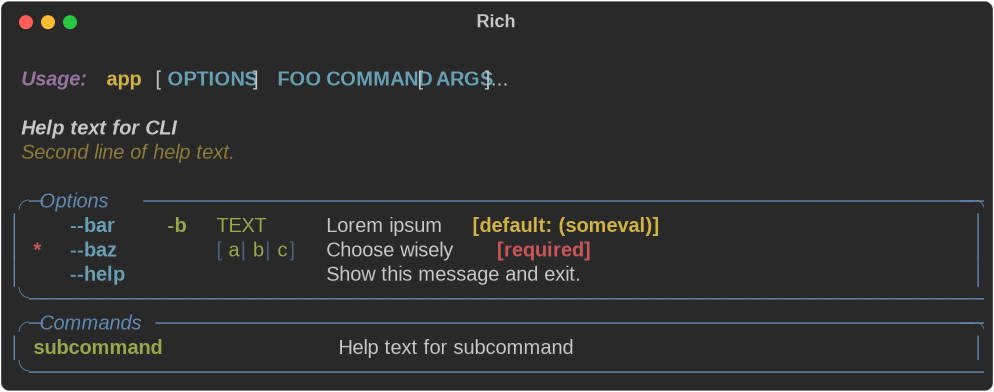
And here’s one that Daniel made:
Daniel's Generated Code
style_option="bold magenta", style_argument="bold yellow", style_command="bold blue", style_switch="bold magenta", style_metavar="yellow", style_metavar_separator="", style_usage="bold blue", style_usage_command="", style_helptext_first_line="bold", style_helptext="", style_option_default="yellow", style_required_short="bold red", style_required_long="red", style_options_panel_border="magenta", style_commands_panel_border="blue")
def cli(foo, bar): """ Help text for CLI
Second line of help text. """
@cli.command("subcommand")def subcommand(foo, bar): """Help text for subcommand"""
if __name__ == "__main__": cli()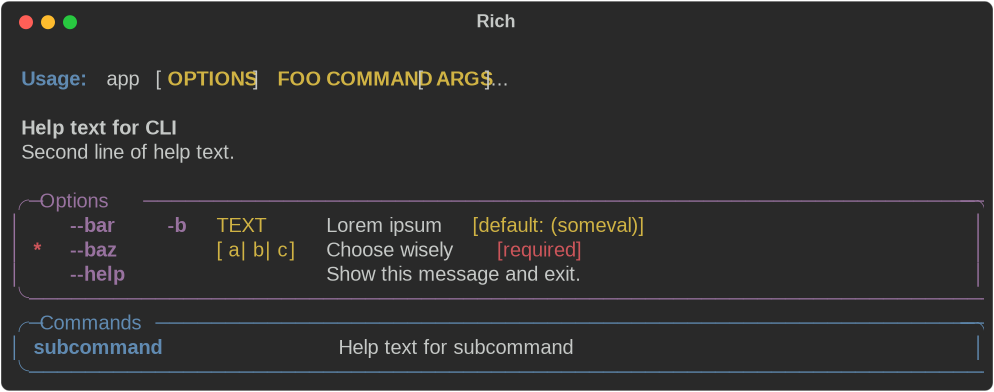
rich-click version 1.8
Section titled “rich-click version 1.8”Generate HTML and SVG with the rich-click CLI
Section titled “Generate HTML and SVG with the rich-click CLI”The rich-click CLI now allows for --output svg and --output html to help easily generate outputs for READMEs and docs:
rich-click --output svg path.to.my.cli:main --help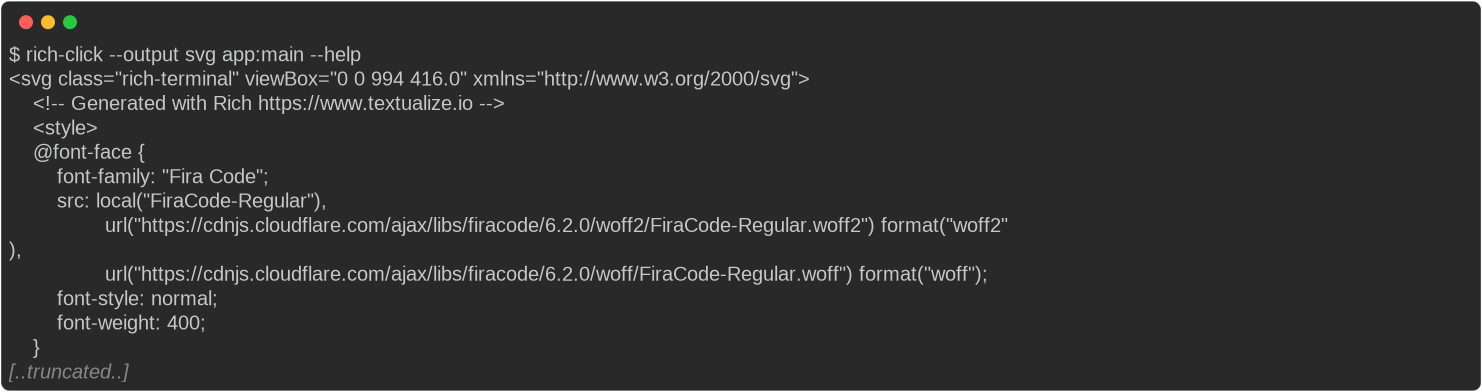
Easier decorator API
Section titled “Easier decorator API”The rich_config() decorator API is now easier to use:
You can pass a dict into the @click.rich_config() decorator. E.g.:
@click.command@click.rich_config(help_config={"max_width": 100})def my_command(): ...Additionally, dicts behave a little differently than RichHelpConfiguration when dealing with parents,
and this behavior can be useful in some contexts.
Basically, the child command uses the parent’s help config as a baseline, and only updates the fields specified in the dict.
So in the following example, my_group will have style_option="red", and my_subcommand will have both style_option="red" and style_argument="green".
@click.group@click.rich_config(help_config={"style_option": "red"})def my_group():    ...
@my_group.command@click.rich_config(help_config={"style_argument": "green"})def my_subcommand():    ...
This can be a little confusing, so we’ve defined explicit rules (and enforced them in unit tests) for how the config is resolved (these are also in our docs):
flowchart TD
A["Did you pass in a @rich_config(help_config=...)?"]
A --> |Yes| Ayes
A --> |No| Ano

Ayes["Was it a dict or a RichHelpConfiguration?"]

Ayes --> |dict| AyesBdict
Ayes --> |RichHelpConfiguration| AyesBrhc

AyesBdict["Is there a 'parent' config?"]

AyesBdict --> |Yes| AyesBdictCyes
AyesBdict --> |No| AyesBdictCno

AyesBdictCyes:::StoppingPoint
AyesBdictCyes["Merge into the parent config,\nand use that"]

AyesBdictCno:::StoppingPoint
AyesBdictCno["Merge into the global config,\nand use that"]

AyesBrhc:::StoppingPoint
AyesBrhc["Use the RichHelpConfiguration  object.\n\n(Note: RichHelpConfiguration's\ndefaults are independent of the\nglobal config.)"]

Ano["Is there a 'parent' config?"]

Ano --> |Yes| AnoByes
Ano --> |No| AnoBno

AnoByes:::StoppingPoint
AnoByes["Use the parent config"]

AnoBno:::StoppingPoint
AnoBno["Use the global config"]

classDef StoppingPoint font-weight: 600;
More style options
Section titled “More style options”The biggest addition to rich-click’s styling options was control over panel styles:
STYLE_OPTIONS_PANEL_BOXSTYLE_COMMANDS_PANEL_BOXSTYLE_ERRORS_PANEL_BOX
Here’s a silly example of what this can do:
Code for silly example
style_options_panel_box="ASCII", style_commands_panel_box="HEAVY",)
def cli(): """ CLI for `app`
This `app` lets you do cool things. """
@cli.command("db")def deploy(): """Database commands for app"""
@cli.command("deploy")def deploy(): """Deploy app"""
@cli.command("self")def self(): """Manage app"""
if __name__ == "__main__": cli()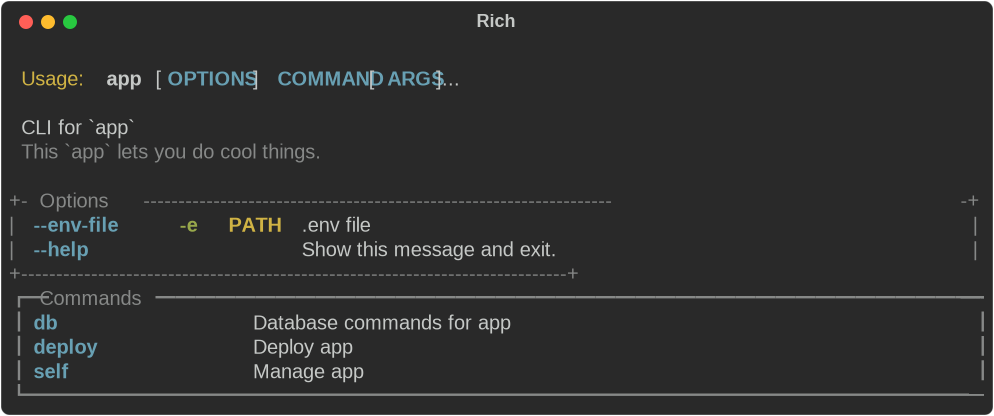
Here’s a simple, stylish, and sleek example that would look great in your app:
Code for stylish example
style_options_panel_box="SIMPLE_HEAD", style_options_table_box="SIMPLE_HEAD", style_commands_panel_box="SIMPLE_HEAD", style_commands_table_box="SIMPLE_HEAD", style_options_panel_border="bold", options_panel_title="[u]Options[/]", use_rich_markup=True, style_commands_panel_border="bold", commands_panel_title="[u]Commands[/]", style_option="green", style_usage="", style_usage_command="", style_argument="green", style_switch="dim green", style_command="green", style_metavar="dim",)
def cli(): """ CLI for `app`
This `app` lets you do cool things. """
@cli.command("db")def deploy(): """Database commands for app"""
@cli.command("deploy")def deploy(): """Deploy app"""
@cli.command("self")def self(): """Manage app"""
if __name__ == "__main__": cli()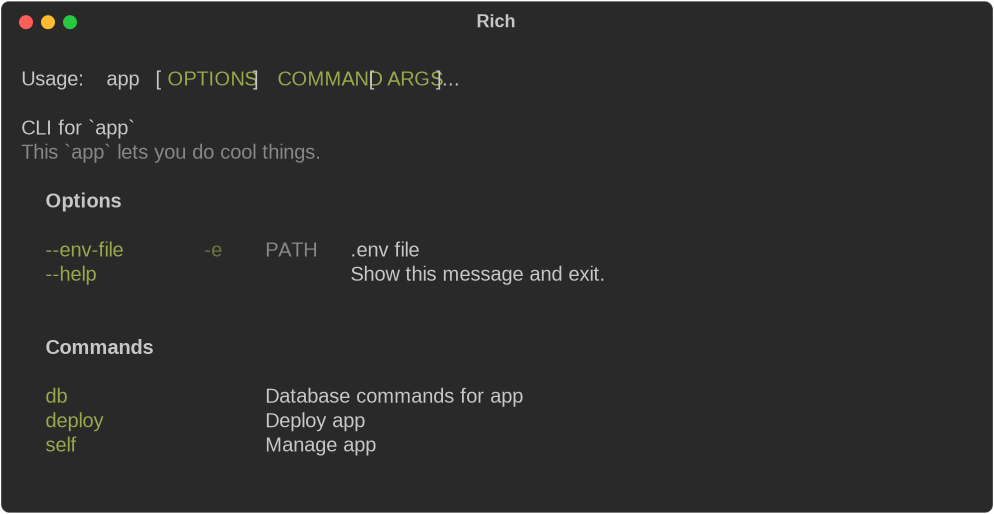
Improvements to option and command group API
Section titled “Improvements to option and command group API”The option groups and command groups are a very powerful and useful feature, but historically they’ve been tricky to work with. The changes we’ve made in 1.8 improve on the API in a few substantial ways.
Better command path resolution
Section titled “Better command path resolution”First, group keys used to only read from the ctx.command_path.
Now they read from the ctx.command_path and the ctx.command.name (or the f"{ctx.parent.command.name} {ctx.command.name}" for subcommands).
This should cause fewer headaches for users!
Longer explanation
What this means in practical terms is easier to explain by example.
For example, the command path for python hello.py --name world is hello.py,
but if you were to set hello as a console script entry point in your pyproject.toml or setup.py,
then the command path for hello --name world would become hello.
This causes an annoying issue where running python my_script.py and venv/bin/my_script had different behaviors,
and it was also unintuitive that the name of the CLI didn’t always work, even when it’s not an entry point.
Now, both approaches work! 😊
# Pick your poison 🧪 Both approaches now work! "super-cool-tool": [...], # `ctx.command.name` "cli.py": [...] # `ctx.command_path` when running "python cli.py".}
def main(): ...Wildcards
Section titled “Wildcards”Wildcards now also work, in case you want to globally define options or simply don’t want to bother spelling out the whole command path.
"*": [...],}
def main(): ...You can also stick wildcards in the front, middle, or end of a key, e.g.:
cli sub-command *cli * sub-sub-command* sub-command *
Long example
"cli * c": [ { "name": "foo", "options": ["--flag1"] } ]}
def cli(): ...
@cli.group("x")def x(flag1, flag2): ...@x.command("a")def xa(flag1, flag2): ...@x.command("b")def xb(flag1, flag2): ...@x.command("c")def xc(flag1, flag2): ...
@cli.group("y")def y(flag1, flag2): ...@y.command("a")def ya(flag1, flag2): ...@y.command("b")def yb(flag1, flag2): ...@y.command("c")def yc(flag1, flag2): ...
@cli.group("z")def z(flag1, flag2): ...@z.command("a")def za(flag1, flag2): ...@z.command("b")def zb(flag1, flag2): ...@z.command("c")def zc(flag1, flag2): ...
cli()This works the way you’d expect:
$ python foo.py x c --help
 Usage: foo.py x c [OPTIONS]
╭─ foo ──────────────────────────────────────────────────────────────────────────────╮│ --flag1    TEXT                                                                    │╰────────────────────────────────────────────────────────────────────────────────────╯╭─ Options ──────────────────────────────────────────────────────────────────────────╮│ --flag2    TEXT                                                                    ││ --help           Show this message and exit.                                       │╰────────────────────────────────────────────────────────────────────────────────────╯
$ python foo.py x b --help
 Usage: foo.py x b [OPTIONS]
╭─ Options ───────────────────────────────────────────────────────────────────────────╮│ --flag1    TEXT                                                                     ││ --flag2    TEXT                                                                     ││ --help           Show this message and exit.                                        │╰─────────────────────────────────────────────────────────────────────────────────────╯
panel_styles + Arguments panel styling
Section titled “panel_styles + Arguments panel styling”The dicts for command+option groups now accept an optional panel_styles key, which passes kwargs to the Panel().
Another handy feature is that the “Arguments” panel (which is created when the config option show_arguments is True)
can now be stylized through the API so long as the following is true:
config.show_argumentsisTrue.- There is an option group with a
nameequal to theconfig.arguments_panel_title(default:'Arguments') - The option group does not have any
options(The list is empty, undefined, orNone).
Example:
show_arguments=True, option_groups={ "my-command": [ { "name": "Arguments", "panel_styles": {"box": box.DOUBLE_EDGE, "border_style": "dim red"} } ] })
def cli(foo, bar, baz): ...
if __name__ == "__main__": cli()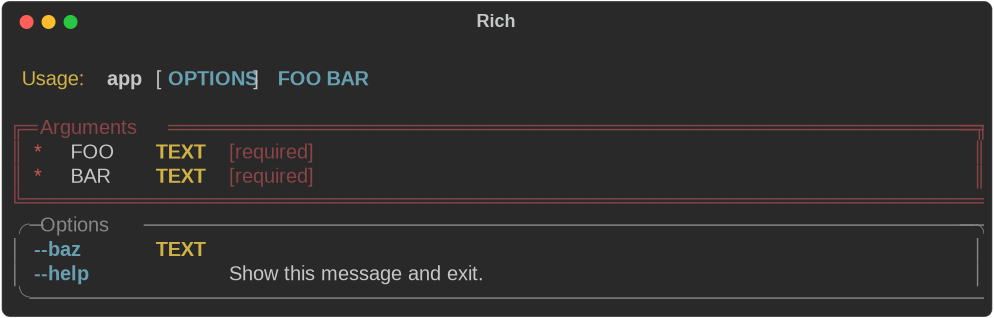
Improved performance
Section titled “Improved performance”During command execution, rich-click now loads faster and takes up less memory than before:
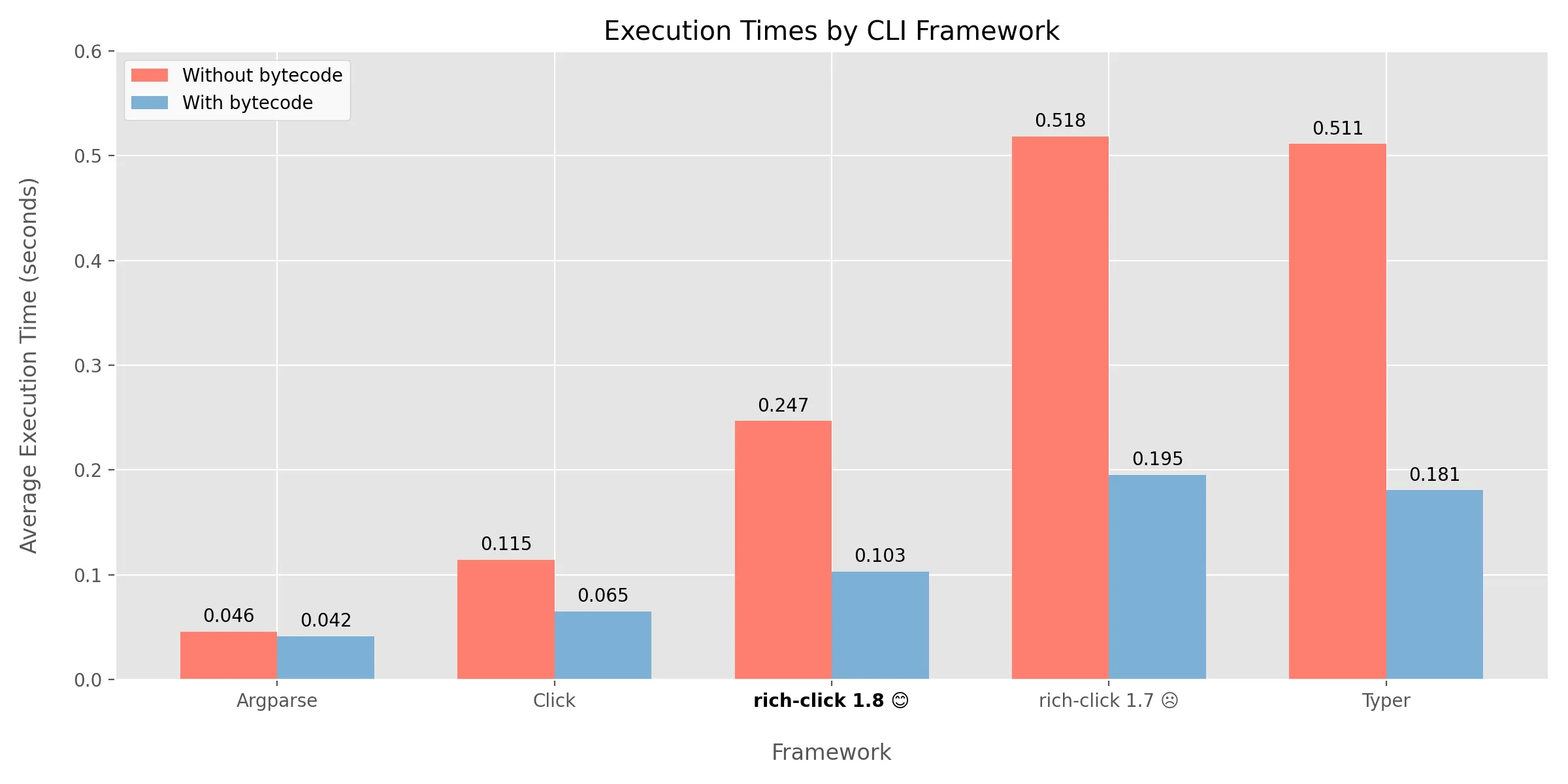
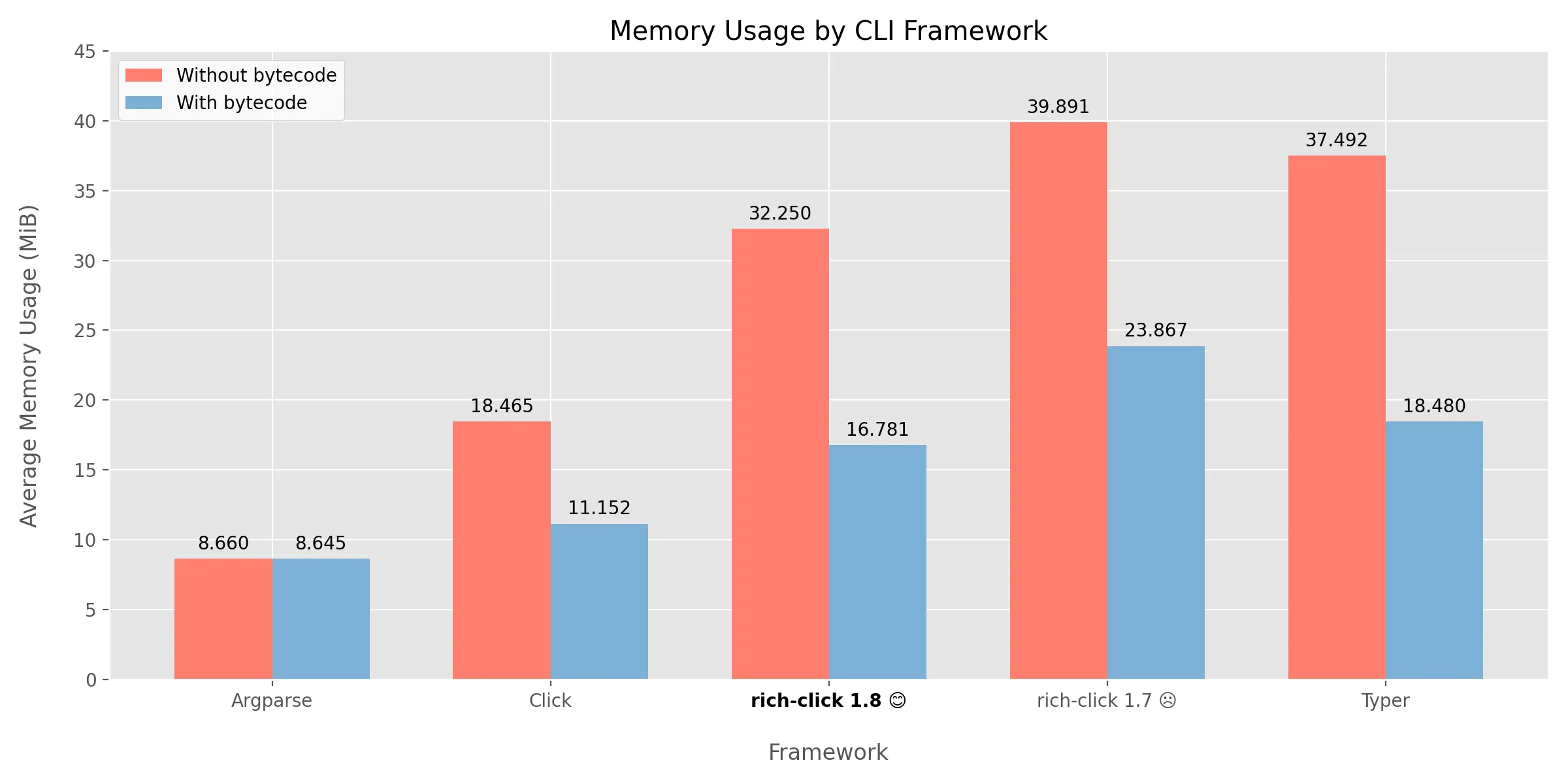
We include the code we ran below. The metrics you see above were gathered by running the below script on an old Macbook.
Profiling script
This is the script we used to generate the data in the bar chart.
This script requires uv and gdate.
#!/bin/bashset -eo pipefail
export VIRTUAL_ENV=.venv_benchmarksexport PY_VERSION=3.12
speed_trials=40mprof_trials=10
###############################################################################
uv venv "${VIRTUAL_ENV}" --python "${PY_VERSION}"
cat <<EOF > hello_click.pyimport click
@click.command()@click.option("--name", default="World", help="Name to greet.")def hello(name):    """Greet someone."""    print(f"Hello, {name}!")    if name == "Daniel":        import time        time.sleep(0.2)
if __name__ == "__main__":    hello()EOF
cat <<EOF > hello_rich_click.pyimport rich_click as click
@click.command()@click.option("--name", default="World", help="Name to greet.")def hello(name):    """Greet someone."""    print(f"Hello, {name}!")    if name == "Daniel":        import time        time.sleep(0.2)
if __name__ == "__main__":    hello()EOF
cat <<EOF > hello_argparse.pyimport argparse
def main():    parser = argparse.ArgumentParser(description="Greet someone.")    parser.add_argument("--name", default="World", help="Name to greet.")    args = parser.parse_args()    print(f"Hello, {args.name}!")    if args.name == "Daniel":        import time        time.sleep(0.2)
if __name__ == '__main__':    main()EOF
cat <<EOF > hello_typer.pyimport typerfrom typing_extensions import Annotated
def main(name: Annotated[str, typer.Option(help="Name to greet.")] = "World"):    """Greet someone."""    print(f"Hello, {name}!")    if name == "Daniel":        import time        time.sleep(0.3)
if __name__ == '__main__':    main()EOF
chmod +x hello_argparse.pychmod +x hello_click.pychmod +x hello_rich_click.pychmod +x hello_typer.py
################################################################################
function get_times {  total_time=0  filename="${1}"  clear_pyc_files="${2}"
  # Run once to compile pyc files  "${VIRTUAL_ENV}/bin/python" "${filename}" --name Phil >/dev/null
  for (( i=0; i < speed_trials; i++ ))  do
    if [ "${clear_pyc_files}" = "true" ]; then      find "${VIRTUAL_ENV}/lib/python${PY_VERSION}/site-packages/" -name '*.pyc' -delete    fi
    start_time=$(gdate +%s.%N)    "${VIRTUAL_ENV}/bin/python" "${filename}" --name Phil >/dev/null    end_time=$(gdate +%s.%N)
    elapsed=$(echo "$end_time - $start_time" | bc)    total_time=$(echo "$total_time + $elapsed" | bc)
  done
  average_time=$(echo "$total_time / $speed_trials" | bc -l)  echo "Average time for ${filename} with clear_pyc_files=${clear_pyc_files}: $average_time seconds"
}
function get_mprof {  total_mib=0  filename="${1}"  clear_pyc_files="${2}"
  # Run once to compile pyc files  "${VIRTUAL_ENV}/bin/python" "${filename}" --name Phil >/dev/null
  for (( i=0; i < mprof_trials; i++ ))  do
    if [ "${clear_pyc_files}" = "true" ]; then      find "${VIRTUAL_ENV}/lib/python${PY_VERSION}/site-packages/" -name '*.pyc' -delete    fi
    "${VIRTUAL_ENV}/bin/mprof" run "${VIRTUAL_ENV}/bin/python" "${filename}" --name Daniel >/dev/null    output=$("${VIRTUAL_ENV}/bin/mprof" peak)    mprof_file=$(echo "$output" | grep 'mprofile' | awk '{print $1}')    memory_usage=$(echo "$output" | grep 'mprofile' | awk '{print $2}' | bc)    total_time=$(echo "$total_mib + $memory_usage" | bc)    rm "${mprof_file}"  done
  average_memory_usage=$(echo "$memory_usage / $mprof_trials" | bc -l)  echo "Average MiB consumed for ${filename} with clear_pyc_files=${clear_pyc_files}: $memory_usage MiB"
}
################################################################################
# Times
uv pip install --no-binary :all: "rich-click==1.8.0"
get_times hello_argparse.py trueget_times hello_click.py trueget_times hello_rich_click.py true
get_times hello_argparse.py falseget_times hello_click.py falseget_times hello_rich_click.py false
uv pip install --no-binary :all: "rich-click==1.7"
get_times hello_rich_click.py trueget_times hello_rich_click.py false
################################################################################
# Memory profiling
uv pip install memory-profileruv pip install --no-binary :all: "rich-click==1.8.0"
get_mprof hello_argparse.py trueget_mprof hello_click.py trueget_mprof hello_rich_click.py true
get_mprof hello_argparse.py falseget_mprof hello_click.py falseget_mprof hello_rich_click.py false
uv pip install --no-binary :all: "rich-click==1.7"
get_mprof hello_rich_click.py trueget_mprof hello_rich_click.py false
We include Typer in our profiling to show a reasonable baseline for a Click wrapper’s overhead. Typer is an ambitious and great project that’s doing quite a bit under the hood, and it’s reasonable to expect it to take a little more time and memory.
Why is rich-click 1.8 more performant? 1.7 left a few free optimizations on the table:
- Only import
richwhen rendering help text. - Use
click.__version__instead ofimportlib.metadata.version("click")for Click 7 compat.
For the first change, this meant replacing code like this…:
Code not shown ) return console…with code like this…:
Code not shown ) return console…so that Rich is only loaded when it is needed!
Combined, these two changes account for the performance improvements you see.
Performance isn’t everything; if it was, we’d all be using argparse, or we’d abandon Python altogether for Rust.
This is also peanuts in the grand scheme of things.
In all likelihood, you’ve spent more time reading this blog post than the cumulative amount of time you’ll save by pip install --upgrade-ing your rich-click 1.7 project.
(There are other reasons to upgrade to 1.8 than performance, of course!)
So why bother improving rich-click’s performance if it’s not a big deal? Because we’re honored every time someone chooses rich-click for their applications, and we want to pay it back by keeping things as efficient as we reasonably can. Your application is complex and special and all yours. We’re excited we get to be a very small part of what you’re doing, 🫶 and we’ll do our best to keep our end of things neat and tidy.
And more…
Section titled “And more…”Under the hood, we’ve done misc. bugfixes and other small internal improvements+refactors, mostly aimed at composability and customizability for advanced use cases. (This does not impact 99% of users.)
Plans for the future
Section titled “Plans for the future”rich-click is not done evolving; 1.8 is just another step on the journey. We already have tons of things planned out for 1.9, which we want to release by the end of 2024.
Before we get there, we are going to spend a little bit of time rewriting and reorganizing our unit tests and adding coverage requirements.
Thank you once again for using rich-click! ❤️❤️❤️❤️❤️